What's New in Version 15.8.00 to 15.8.03
Version 15.8.03
Enhancements
Administration
 Harmonising Leave Accruals based on Worked Hours
62165
The calculation of Leave Accruals based on Worked Hours and the rolling forward of the Date Accrued To on the employee's Leave Entitlement records has only been performed when some Hours Codes configured to be included in the Hours Worked for Leave Accrual are processed in the payrun. In most scenarios where employees receive pay slips that do not include any Hours Codes with this configuration, their Leave Entitlement records remain unchanged with no updates to the entitlements or the Date Accrued To.
Although this may be acceptable to many customers, we were informed that it is not always desirable to leave the Date Accrued To unchanged, particularly when Leave Entitlements are integrated with external T&A or HCM systems which project leave entitlements if the Date Accrued To is in the past.
For customers who are happy with the current behaviour of not moving the Date Accrued To forward unless the employee is paid some Hours that affect the Leave Accrual, there is no need to make any changes. If there is a preference to have the Date Accrued To moved forward when the Leave Accruals are calculated over a period where the employee receives a pay slip, regardless of the paid amount or whether pay slip contains hours that have been configured as 'Include Worked Hours in Leave Accruals', a new Program Control option has been introduced. To update your Preceda database to the new behaviour in this scenario, you can update Position 29 of Program Control LVACC to 'Y'.
| Name | Position | Option |
Description |
|---|---|---|---|
| Leave Accruals on Worked Hours when pay slip has no Hours set to be included in the Accrual | 29 | Y |
Update the Date Accrued To of Leave Entitlements based on Worked Hours whenever the employee receives a pay slip, even when it only includes Allowances or Hours which are not configured to increase the leave accrual. |
|
N (Default) |
Do not update the Date Accrued To of Leave Entitlements based on Worked Hours unless the employee receives a pay slip containing some Hours configured to be included in the leave accrual calculation. |
Improved Maintenance History for Effective Dated Changes
69566
Any information changes linked with a future effective date are not immediately reflected in the Employee Maintenance History screen but is updated during midnight by a maintenance program, Active Record Rollover.
During the maintenance program execution, system overrides changed user information by the system user by "PRECEDA" and user change date and time overridden by rollover date and time which distorts original change user information. This has raised confusion among business users.
To avoid such confusion and enhance user experience, the Employee Maintenance History screen has been updated to have new fields to display the Original Changed User information (left information panel) for future effective dated and non-effective dated transactions. These fields will show the original change username, date, and time to which the data was changed prior to the run of the latest Active Record Rollover. The change made by the maintenance program will still be displayed in the screen.
For history transactions, system will populate original user information on the fly when business user opens the maintenance screen drilldown page.


|
This new feature has been posted as Ideas Preceda Community and has successfully made it into Preceda V15.8.03.
To access the links, make sure you are logged in to Preceda Community. |
Integration
Global Logon Messages
70510
The Global Logon messages have been improved ensuring that the correct error message is displayed based on invalid attempt/s of the user.
-
For any invalid attempts prior to the 2nd last and last attempt: "Access denied - the information you have entered is incorrect. Please try again".
-
For the attempt prior to the last retry (number of retries limit is set per database): "Warning: Next invalid login attempt will lock the account".

|
This new feature has been posted as an Idea: Looping in attempt message misleading on Preceda Community and has successfully made it into Preceda V15.8.03. To access the links, make sure you are logged in to Preceda Community. |
Preceda and Dayforce Integration
Phase 2
68164
As mentioned in a recent Customer Forum, your current investment with Preceda is protected, as Preceda will continue to be developed and enhanced. At the same time, you would have the chance to extend to Dayforce for additional business capabilities (e.g. innovative HCM, Workforce Management, advanced HR Analytics, as well as a harmonized employee experience).
We are happy to update you the integration development in progress. Items added to / updated in Preceda in V15.8.03 are:
-
Dayforce Configuration Mapper (M001820)
-
Dayforce Configuration Extractor
-
Dayforce File Submission Extractor
-
Dayforce Configuration screen
-
Dayforce File Submission screen
If you are interested in learning more about this integration for your organisation, please reach out to your Account Executive.
Payroll
Download / Email Multiple Pay Slips
69115
Preceda now supports the download and email of multiple Pay Slips as well as the capability to email Pay Slips to multiple recipients in one go. The Earning History screen and ESS Pay Slip screen have been updated.
There are three possible actions that can now be done to the Pay Slips via the Earning History screen and ESS Pay Slip screen - View, Download, and Email. A new checkbox Select All (X) Pay Slip(s) is available to allow selecting all Pay Slips from the browselist. To shortlist the Pay Slips to be downloaded or emailed, you may want to utilize the Filter icon to specify the selection criteria, or simply hold Ctrl or Shift while you click the mouse.

View Pay Slips
The View button (  ) will be enabled when some Pay Slips are selected from the browselist and the Select All (X) Pay Slip(s) checkbox is unticked. Clicking the button will open the Pay Slips in PDF format, each in separate tabs.
Download Pay Slips
The Download button ( ) will be enabled when either some Pay Slips are selected from the browselist or the Select All (X) Pay Slip(s) checkbox is ticked. When only one pay slip is selected, clicking the button will also only download one PDF file, while when multiple pay slips are selected, a zip file containing all the pay slips in PDF will be downloaded.
Email Pay Slips
The Email button ( ) will be enabled when either some Pay Slips are selected from the browselist or the Select All (X) Pay Slip(s) checkbox is ticked. When the button is clicked, the Email Pay Slip drilldown will open to allow more than one (1) email addresses to be provided.

Encryption to emailed Pay Slips has not been changed. If encryption is turned on in the database, the recipients of emailed Pay Slips would continue to need password to decrypt each Pay Slip PDF. It is thus recommended that users to download Pay Slips and enclose them into an email, if they wish to send them to entrusted third parties.
|
|
This new feature has been posted as Ideas Preceda Community and has successfully made it into Preceda V15.8.03. To access the links, make sure you are logged in to Preceda Community. |
Employee Share Scheme (ESS) - Share Scheme Type P
70820, 70821
To comply with ATO latest directives, the option Share Scheme Type - P (ESS interest acquired pre-1 July 2009) has been re-enabled for Scheme Type field via the Employee Share Scheme Statement History screen drilldown.

When Type P is selected all ATO fields will be disabled with zero (0) as value, except for the Number of ESS - Taxing Point where the user can input their desired value.
Additionally, when the Type P is selected and the Financial Year input value is 2019 and before, the Discount on ESS Interests field will be enabled where the user can input their desired value. For Financial Year 2020 and after, the field will be disabled with zero (0) as value.

Note that these changes are applied to the mapper accordingly.
System Management
Display of PCR Number, Date and Time on Help-About Screen
67170
Preceda Help-About screen now displays the latest PCR Number as well as the Date and Time of the latest application.

Corrective Maintenance
The following Defects have now been addressed and resolved successfully.
Administration
Classification R hours codes (RDO) via Mapper Upload for EVSS
69699
Hours Type Code of Classification = R or RDO is now handled correctly whether entered via Entry via Single Screen or imported via Mapper M000471.
Termination Date on Multiple Transfer via M001428
69178
Multiple company transfers on the same day via Mapper M001428 now handles the Termination Date correctly. You can now successfully perform multiple transfers via Mapper M001428 where the Termination Date no longer comes before the Transfer Date, and if there is no Transfer Date, the Termination Date is not set earlier than the Hire Date.
Framework
Character Limit of Mapper M000051 (Salary Step Links)
69242
Mapper M000051 no longer rejects the import of a Step From Salary or Step To Salary code value that is greater than four (4) characters in length as it now successfully accepts Step From Salary or Step To Salary values of up to 10 characters.
Distribution Spoolfile on Console
70344
The Distribute Spoolfile on Preceda Console now correctly displays all the Output Files. Likewise, the Add Filter button is now enabled and the Distribution button is working properly for imported and saved distribution definition.
To all impacted customers:
Kindly follow below steps and check if the issue has been fixed on your end:
-
Go to Console > Spoofiles, then select the File you want to distribute.
-
Click Distribute to open the Distribute Spoolfile window.
-
Click Tools > Export Distribution Definition to get the current distribution list that is corrupted, then save it somewhere.
-
Click Tools > Import Distribution Definition and select the file that has been saved just now.
-
Click OK to the message: Imported package file contains duplicate in FNAME property of filter file. It has now been fixed and should be saved to keep it permanently.
-
Check if it fixes the issues.
To save the auto-fixed distribution list and replace the corrupted one, you may further:
-
Click Save As.
-
Select the original Distribution Name.
-
Click OK.
Ending a Bank Split with Action = D in Bank Details Mapper M000656
59028
Bank Details Mapper M000656 will now correctly update Net Bank file when delete action (Action = D) is used to end a Bank Split early.
Payrun Message Screen Error
70342
The Payrun Message screen has now been fixed so that no error will be encountered when there are more than 9,999 records available.
Search on Organization > Positions > Associate groups/ Certification with position, Preceda logs out
70112
The user session will no longer be affected when searching on Organization > Position > Associate groups/ Certifications with Position screen.
Payroll
A/D Code Description on Pay Enquiry
60219
Pay Enquiry for each Pay Separator on Entry via Single Screen now displays the correct description for A/D TAX/ADJ. The description of A/D Code added on a standard pay slip is no longer being copied over to the additional pay separator's A/D Code description.
Company Totals in Express Pay Report
66115
The Express Pay Report will now show the correct Company Totals per Cost Level 1 when Express Pay transactions with zero (0) dollars to the Net Bank account exist.
Costing splits in Express Payments
69222
The processing of Costing Splits has been fixed and will be applied as expected for transactions generated by Express Payment.
EFT Group Deductions in Bank Credit Report
69431
EFT Group deductions will now correctly and consistently display in Bank Credit reports (PAY65, PAY68) and PAY64 report.
EFT Processing Report
54660
The EFT Processing Report - EFT Consolidated Negative/ Zero Amounts is now showing the correct employee details.
Payrun Calculation Error for Retro Payments
70406
No error message will now appear after running Retro Pay when more than 100 messages exist per one employee. Payrun calculations will now successfully proceed as expected.
Retro Calculation for Termination Payment with Overtime
58855
Retro is now correctly calculating where retro over termination payment includes overtime.
Special Characters in Employer Information screen
70949
Employer Level 1 and Level 2 descriptions with special characters, entered via Employer Information screen, can now be reported through STP. Any invalid character value written in the STP xml file will now be parsed and be replaced with a space so that submission to ATO will not fail.
Update of Leave entitlements and Leave History for Terminated Employees via Express Payments - Termination Wizard
69316
Leave entitlements are now correctly updating for a terminated employee whose termination process was executed via the Express Payments - Termination wizard and passed to the Time Card Entry. Additionally, the employee's Leave History will now reflect correct values upon closing the corresponding Payrun.
Remuneration
Clearing Contract Paid Amount
69200
The Contract Paid Amount is now getting cleared (i.e. set to zero) when saving a new package or inserting a current A/D record which Effective Date is after Paid Up to Date.
Version 15.8.02
Enhancements
Administration
Calculate Leave Accrual Process (Outside Payrun)
69345
The Calculate Leave Accrual process has been enhanced to accrue leave for Work Hours-based payments made in off-cycle payruns. This update identifies and processes all employees who are paid based on Worked Hours and paid through an Off Cycle Payrun, regardless if leave accruals have already been completed for the same period end date in the previous Payrun (i.e. calculate leave accruals for all payment made in off-cycle Payrun).
To improve the accuracy of leave accrual process, the system has been changed from using Earning History files (PEPWAD, PEPWEH) to the Timecard Cost History file (TCOSTH) as a source of information for Work Hours base Leave Accruals.
Hover Over Comment on Review Leave Application
67169
A hover over comment feature has been added to the Review Leave Application. This enables Managers to quickly review leave comments on the leave browselist without needing to drill down on the details screen. This hover over comment feature increases the overall user experience and awareness of valuable information for manager approval, thus supports rapid decision-making.
The comment icon is available on the Review Leave Application screen if a comment exists in the leave request. If there is no comment for a leave request, the icon on the screen is hidden. Hovering over this icon on the browselist will display the actual comment of the leave request (i.e. to show up to 252 characters).

Leave Accrual Method Validation for Anniversary Branch
61827
A new screen validation has been added to Leave Accrual Method screen for Anniversary Branch. This new validation identifies whether the leave accrual methods are correctly configured with Anniversary Branch against the Period No. This validation ensures that the:
-
Anniversary Branch must not be equal to the Period No;
-
User is informed of the action to take (i.e. update the Period No).
The same validation has been applied in the corresponding Mapper (M000041) and Leave Calculation program, ensuring that incorrectly configured data are skipped. If a given customer database has incorrect combination of data recorded for Anniversary Branch and Period No, the Leave Calculation program skips the incorrect records and outputs a validation message to the exception report. Similarly, if any incorrect combination of data (Anniversary Branch vs Period No) has been imported using the corresponding Mapper, a validation message will be made available in the mapper report.
Sort Leave History Entries by Date
69584
The entries on Leave History screen are now by default sorted from the latest Leave Start Date. This saves you effort to sort them by date every time you come to this screen.

|
|
This new feature has been posted as an Idea: Leave History screen should auto sort by date not leave type on Preceda Community and has successfully made it into Preceda V15.8.02. To access the links, make sure you are logged in to Preceda Community. |
Payroll
Updated Source of Change in Timecard Cost History for Data Imports
63066
The Source of Change associated to Hours and A/D transactions in Timecard Cost History (TCOSTH File) has been updated to include specific information for records imported into the Payrun, to easily differentiate these from any manually entered records. The new Source of Change identifiers include MAPPER, ESS, and PAY43T. This information can be reported over in Extractor via Administration > Earnings > Timecard Cost History.
Below is a table to represent the primary sources you may see and their corresponding sources:
| Source |
Extractor: Timecard Cost History Field Name: Source of Change |
|---|---|
| Manual data entry | TIME CARDS |
|
Import via Mapper M000471 Inbound Integration - M000471 T/A Import - M000471 |
MAPPER |
| Import Self Service Transactions to Payroll | ESS |
|
T/A Import - PAY34T (in non-TIME database) T/A Import - PAY34T (in TIME database) |
PAY34T TIME |
| Export to Payroll | TIME |
| Release Retro transactions | RETRO PAYP |
Time
Allow 10 Pay Period Rules in Selection Criteria
60383
The Selection Criteria screen, commonly used in TIME processes, has been enhanced enabling the selection of up to 10 Pay Period Rules. This will save you effort in running the process more than once just to accommodate employees associated with different Pay Period Rules. This update applies to all screens containing the Selection Criteria such as:
| Absentee Report | Headcount Report | Time Cards Report |
| Absentee History Report | On Premises Report | Time Card History Report |
| Annualised Salary Reconciliation Calculation Wizard | Pay Period Recalculation | Time Monitor Report |
| Annualised Salary Reconciliation Payment Wizard | Post Times | Time Monitor Update |
| Budget vs Actual Report | Post Times - No Roll | Total Hours History Report |
| Budget vs Actual History Report | Pre Post Time Report | Total Hours Report |
| Consecutive Days Off Report | Primary Roster Export | Unachieved Shift Break Report |
| Coverage Report | Punch Detail History Report | Wage Analysis History Report |
| Create Bulk Entry of Time | Punch Detail Report Selection | Wage Analysis Report |
| Employee Master Report | Reverse Posted Times | Weekly Roster Report |
| Expanded Labour Analysis History Report | Rostered Not Clocked In Report | Weekly Transfer Roster Report |
| Expanded Labour Analysis Report | Split Shift Report | Work Pattern Roster Copy |

To Date on Annualised Salary Reconciliation Calculation Wizard
66649
A Date / Time (To) field has been added on the Annualised Salary Reconciliation Calculation Wizard > Selection Criteria screen. This is introduced to address the need of reconciling an employee up to a Period End that is different from their latest Period End. This could be most relevant when employees have been moved off from an Annualised Salary clause but reconciliation was missed before further payruns are closed.

-
The Date / Time (To) is editable and optional. When left blank, the process will reconcile employees up to their latest Period End on or before their Due Date.
-
When a To Date value has been provided, the processing will run on the date range from the employee's Annualised Salary Review Start Date, reconciling up to the latest Period End Date on or prior to an earlier value between these two:
-
Employee's Reconciliation Due Date -1; or
-
The To Date specified.
-
The calculated result will be passed on to the Payment Wizard for further processing as it happens now. This option is only relevant when you run the Annualised Salary Reconciliation Calculation Wizard manually (i.e. the reports auto-generated upon Payrun Close are not affected by the setups here).
Corrective Maintenance
The following Defects have now been addressed and resolved successfully.
Administration
FTE Hours Per Week Value on Base Hours Update
67854
Updating an employee's Base Hours (e.g. from 38hrs/week to 22.4hrs/week) will trigger an update to the Employee FTE Hours Per Week and FTE Hours per Week. This would happen when the Program Control FTE Full Time Equivalents Positions 14 and 16 have been configured to Y and O, respectively:
-
Calculate FTE - Calculation of Employee FTE will be performed by the system and the Employee FTE field is read-only.
-
Override the value for Employee FTE Hours per Week with Employee Base Hours.
Gender Field on Personal Screen
69197
The Gender field on the Personal screen now correctly uses and displays the Code in the input field instead of the Description.
Payroll
A/D Rate on Time Cart Entry Report
68565
Entering a value of '99999.9999' as rate for an A/D on the Entry via Single Screen now correctly displays '0.00' on the Time Card Entry Report, properly considering it as an override of zero instead of rounding the value.
Calculation of Allow/Deduct Rates
67788
The calculation in Express Pay Wizard and Termination Wizard now includes the correct calculation of the Allowance/Deduction rates, which is equivalent to difference between Contract Amount and Contract Paid Amount.
Clearing Self Service Transaction and Cancelling Leave
67113
Self Service Transactions from payroll are now successfully cleared when resetting payrun and canceling leave, ensuring that the cancelled leave is not included in the employee payment.
Generated Report on Bulk Pay slip Options Update
58936
When using the Bulk Pay slip Options Update, only the selected employees (i.e. submitted for a specific Company for a specific Pay slip Type and Pay slip Delivery Method) are now correctly being updated and reflected in the report. This no longer includes all employees, unless specified, and properly referencing the Selection Criteria for an accurate reporting.
Out of Balance on Payroll File Master Control Report
68582
The extra records which Preceda issues is no longer double calculated when updating Gross, Tax, & Net, regardless of deductions or allowances so that the balancing record will still remain, and no out of balance occurs on the Payroll File Master Control Report (PAY12PRT).
Prorating Worked Hours with Effective Dated Changes
60640
The prorated Worked Hours are now rounded correctly before and after having Effective Date changes, (i.e. when generating retro with an effective dated costing change).
Retrieving Pay Rate Position 23
66825
The Pay Rate for Position 23 is now picked up successfully when referenced in Hours Type Codes and elsewhere, confirming the proper pay rate being retrieved for the correct overtime calculation and payment.
Rounding Off Leave Accrual Value
66811
LSL accruals are now accruing correctly (i.e. when using Unit Type = Weeks or run Fortnightly). The leave accrual value is properly being rounded off to five decimal places before getting truncated.
Remuneration
Salary Review and Import Process
67886
The Salary Review and import process have been fixed so that the Gross for Super Package Components are now correct when implementing a change via Import Salary Review.
Reporting Tools
Console > Distribute Script Error
69116
You can now run the package successfully without any error message occurring on Console > Distribute - Spoolfiles, after the package is selected and distribution is run/modified.
Report Manager Package with Extract Task - Run Time
69220
You can now successfully create a Report Manager Package with Extract Task that has Run Time Parameters without any issues.
System Management
Year End Reconciliation Process for Employees in the Current FY
69409
Only employees who are reported in the current Financial Year via STP or PSAR are now included in the Year End Reconciliation process, avoiding any error and no longer holding up the integration. Any employees terminated with zero YTD figures and with all E018 flags set to blank no longer appears on the PSAR report.
Version 15.8.01
Enhancements
Integration
Preceda and Dayforce Integration
67141
With the acquisition of Ascender by Ceridian we now have an integration between Preceda and Dayforce, Ceridian's flagship HCM Product so you can take advantage of both Ceridian offerings.
The integrated experience is as follows:
-
The Payroll Experience - Preceda will continue to be used for payroll processing. All the payroll processing features currently being used, e.g. One Step Processes, Health Checks, Payroll Dashboard, will still be available in Preceda to help you effectively run your pay.
-
The Employee, Manager and HR Experience - Dayforce can be used for combining the Employee and Manager experience into one interface. It can include everything from leave applications and approvals, time sheets, HR functions and more. From the HR Admin perspective, this covers the entire cycle from recruitment to succession planning.
The information from the key activities conducted in Dayforce will flow into Preceda, as required for payroll processing, thereby creating a one-stop shop integrated solution for all HR and Payroll needs between the two interfaces.
Below is the list of some key offerings available in the Dayforce and Preceda:

If you are interested in learning more about this integration for your organisation, please reach out to your Account Executive.
Organisational Management
Option to clear or retain existing Cost Level upon Position change with Costing Defaults applied
64825
The 'Use this level' concept has now been introduced to the Costing Defaults. It is a checkbox on the screen and a Y/N via mapper (M000087). It enables the flexibility at each Cost Level to determine whether an employee's existing Cost Level information should be affected at all if Costing Defaults is applied in a position change.
There can be three (3) combinations to a Cost Level when defining a Costing Defaults. Below explains what each combination means to an employee in their position change:
| Use this level | Cost Level | When Costing Defaults is used in Position Change |
|---|---|---|
| Ticked / Y | With value | Use this value |
| Ticked / Y | Blank | Clear out existing if any |
| Unticked / N | Blank | Retain existing if any |
Example:
| Use this level | Cost Level | Example | When Costing Defaults is used in Position Change |
|---|---|---|---|
| Ticked / Y | With value |
State Cost Centre |
Result: SA Result: LJTRAVEL |
| Ticked / Y | Blank | Account Department |
Result: blank Result: blank |
| Unticked / N | Blank | Location Wage Groups |
Result: retained existing Result: retained existing |

The 'Use this level' flag is not relevant to Cost Level 1, because this Cost Level 1 is not affected by position change anyway. Similarly, it is not relevant to Job Title either.
All existing Costing Defaults will be updated as below:
| Cost Level (in 15.8.00) | Use this Level (in 15.8.01) | Cost Level (in 15.8.01) |
|---|---|---|
| With value | Ticked / Y | With value |
| Blank | Unticked / N | Blank |
Adjustments might be needed before you apply them to the next position change.
Mapper and Extractor Updates
A new mapper (M000087) for Costing Defaults has been introduced.
Extractor is updated accordingly to include the new 'Level x Used' fields.
|
|
This new feature has been posted as an Idea: Add Mapper for Costing Defaults M000087 on Preceda Community and has successfully made it into Preceda V15.8.01. To access the links, make sure you are logged in to Preceda Community. |
System Management
Preceda Branding Update to Ceridian
64389
With the Ceridian acquisition of Ascender, Preceda Desktop and Mobile's look and feel has now been updated to the Ceridian branding and theme.
Preceda Desktop Logon page:

-
The new log in experience applies to ALL Users.
-
The new experience after log in takes effect automatically ONLY for users:
-
Not using customised themes;
-
Not associated with Group Profiles; OR
-
Who are associated with Group Profiles,
-
AND Group Profile -> Theme Name = blank
-
OR Group Profile -> Theme Name = PRECEDA ASCENDER (in 15.8.00).
-
-
-
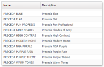
Users who are associated with Group Profiles AND Group Profile -> Theme Name in below image will notice the Company Logo being changed to Ceridian Preceda.

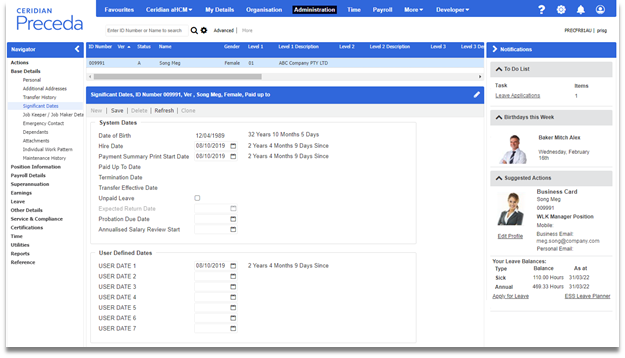
Preceda Desktop's new Default look (i.e. updated menu background colour, new Ceridian Preceda logo, blue and grey theme):
Preceda Mobile colours and logo have also been updated to Ceridian Preceda.

Preceda's Online Help, the Knowledge Base (KB), has also been rebranded to the Ceridian look and feel.
-
Please note that the KB Toolbars are now within the KB Page's content section, and all are left aligned.
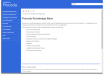

Corrective Maintenance
The following Defects have now been addressed and resolved successfully.
Administration
Bulk transfer error via Company transfer Activity ID M000776
61635
Company Transfer is updated to handle bulk transfers that involve changes in more than 1 level, e.g. Cost Level 1 + Payrun Group.
Invalid Bank Details Record created via Mapper M000656A
65101
Bank Details Mapper M000656A will no longer create orphaned or incomplete Net Pay bank details for employees who have not yet been hired in Preceda.
Mapper M000656* fails to load if there are no Allow/Deduct records available
63080
Bank Details Mappers M000656* will be processed normally even if no employee in the database has any Allow/Deduct records - usually the case when implementing a new database.
Unable to Save Changes in Classification Screen
68242
Saving changes in Classification screen no longer produces an error message. Changes are now saved successfully.
Framework
Resize 'Position Structure' or 'Position Occupants' window causing Yikes error in Chrome
64510
When using the Google Chrome browser, resizing the drilldown windows of Position Structure and Position Occupants in Org Units screen (M001646) no longer produces any Yikes or script error.
Payroll
ETP Tax Calculation issue when OTP Bonus is paid as part of Termination Pay
68660
ETP Tax calculation is now corrected to ensure that when working out the concession/non-concession part in an ETP payment, OTP payment is reduced from the whole-of-income cap.
Issue with tax calculation when details pulled into termination wizard from EVSS when retro transactions exist
63516
Tax calculations from the Termination Wizard are now correctly passed to the payrun when transactions from Entry via Single Screen including results from Retro Pay were imported into the Termination Wizard.
Leave Reasons records not generated for Terminated Employees
68714
Leave Reason records are now generated as expected for terminated employees, as well as for active employees that will not be paid again in the financial year.
Occupants Report Process causing a MSGW if no employees in E017 for the data range selected
63528
Occupants Report process is updated to complete normally even if no employee would be found in the specified date range.
Retro creation for Retroable A/D Codes
60652
Retro Pay now generates results as expected, even when changes have been made to other employee standard A/D records that are not flagged for inclusion in the Retro Pay calculations.
Tax Weeks Override in Express Pay and Termination Wizard
61124
The Tax Weeks Override value is now referenced and displayed correctly in Tax Weeks Used in Calculated Payment drilldown when Post Data from Time checkbox is ticked in Express Pay and Termination Wizard.
Total Tax in PAYG Report
68370
The Total Tax column in PAYG Tax Report now displays the correct value each Period End Date.
Time
Calculation of Total Distribution of Hours
59966
When hour and minutes is chosen for Elapsed Time Format on the Time Configuration screen, the Total Distribution of Hours is now correctly calculated upon save. It is now correctly reflected against the values displayed in the drilldown of Time Editor > Total Hours to be Distributed.
Punches displayed as read-only in Time Editor
58705
Some punches for a few employees were loading as read-only preventing it to be approved or edited. This has now been fixed to ensure that punches in Time Editor are not being greyed out when user inserts a punch via Insert Punch button on Time Editor Screen and importing Transactions.csv file using Preceda Connector.
Version 15.8.00
Enhancements
Administration
Add changes to Employee Leave Entitlements to the Audit Log
64530
To assist customers and the support team with investigating issues related to an employee's leave balance and calculations within G/L Leave Liability Movement, changes made in the Employee Leave Entitlements (PEPACC) file, via the following actions, are now captured in the Employee Audit Log (A001):
-
Updates to the Leave Entitlements via screen
-
Updates to Leave Entitlements via Mapper M000657
-
New Hire via Hire Wizard with Leave Entitlements added manually
-
New Hire via Hire Wizard with Leave Entitlements added via Position via Leave Defaults
-
New Hire via Hire Mappers (M999777, M999777BK, M999777NZ, M999777NZBK, M999777PH, M999777PHBK) with Leave Entitlements added via Position with Leave Defaults
-
Position change to a Position with Leave Defaults via screen
-
Position change to a Position with Leave Defaults via Mapper M000222E
Note, however, changes made to the Leave Entitlements via the following actions will NOT be captured in the Employee Audit Log (A001):
Update Issued Date and Expiry Date fields on Passport Details and Lic/Reg Summary Screens
64220
The Issued Date and Expiry Date fields on both Passport Details and Lic/Reg Summary screens have been updated to allow users to input the correct year using the dd/MM/yyyy (i.e. 01/01/2035) format instead of the previous dd/MM/yy (i.e. 01/01/35) format.

Framework
Make Print Preview available for screens with buffered and non-buffered view list
60374
The Print Preview option is now made available for more Preceda screens and drilldowns. If the feature is not in the menu bar, access it via Tools > Print Preview.
A few screens you may feel interested in:
-
Time Editor (T000002)
-
Review Retro Pay (M001692)
-
Retro Entry via Single Screen (M001737)
-
Annualised Salary Reconciliation Payment > Calculation Options (T000216)
-
Annualised Salary Reconciliation Payment > Review Calculation Selected (T000217)
Preceda Crystal Report Cross Browser Support
66185
Preceda is updated to support running Crystal Report on non-ActiveX browsers. This means browsers other than IE can also be used to run Extractor Crystal Report.
In non-ActiveX browsers, Extractor has been updated to cater for this:

In non-ActiveX browsers, Console has also been updated to allow downloading Crystal format datafiles. If such a file is available, you may download it by clicking the View button.
Update Fields Release Express Payments View in Extractor
61899
The Release Express Payments extractor is updated to report over the values calculated in the Wizard.
New fields added: Hours Value, A/D Value.
Existing fields relabeled: Leave Unit to Leave Units, A/D Unit to A/D Units.
Some fields are repositioned.
Organisational Management
Update Payroll Defaults and Mapper Hire Defaults screen for STP Employment Basis
66009
The Payroll Defaults screen has been updated for all countries to improve user experience by grouping relevant fields to group boxes.
Meanwhile, a new field STP Employment Basis is added to both the Payroll Defaults screen and the Mapper Hire Defaults screen for Australia. This is to assist with capturing information for Single Touch Payroll (STP) Phase 2 reporting.
A new field Employment Status is added to the same screens for Philippines.

|
This new feature has been posted as an Idea on Preceda Community and has successfully made it into Preceda V15.8.00 To access the links, make sure you are logged in to Preceda Community. |
Corrective Maintenance
The following Defects have now been addressed and resolved successfully.
Administration
Certifications obtained showing multiple records for employees - possible multiple roles issue
67375
Certifications Obtained screen has been updated to display employee's certifications only once.
If an employee has been associated with the same Certification in multiple ways (e.g. via two or more Positions or Groups) a tooltip will appear in the newly introduced Associations column to indicate this.

Change Reason in Effective Dated display windows when employee is terminated
65435
Termination processes have been updated to ensure that Change Reasons on employee's salary, payment details, etc. are retained after termination.
Conversion of Hours error in Leave screens
67533
Applying for leave via My Leave and Leave by Proxy will no longer freeze when the Hours Away or Public Holiday Hours Away is greater than the scheduled working hours.
Framework
Display Issue with Subscribers in Report Manager
63298
In the Report Manager, the newly added and saved subscriber is now retained and displays the correct details upon reopening. When the newly added subscriber is searched, the correct details will also be displayed.
Extracting security profiles shows incorrect security profile details
62577
When extracting Security Profiles in the Extractor, the generated report will now contain the correct data using the selected/saved preferences.
Input of Decimal Separator (.) for Leave Application in Preceda Mobile
62040
Preceda Mobile has been updated to allow entering the decimal separator or dot (.) in iOS devices. This update has been implemented when entering hours on the following:
-
Hours Away and Public Holiday hours away fields on My Leave screen
-
Hours field on My Time
Message Wait Error on Report Generating Programs
62741
Due to large spool file creation, a Message Wait occurred for some of Report Generating Programs when processed. This has now been fixed by increasing the limit size for spool creation to a maximum record of 2000000 for the following reports:
-
G/L Posting PDT File Report
-
Retrospective Pay Report
-
Maintenance Audit Report
-
Bulk Pay slip Options Update
Single Run Scheduled Jobs can't be deleted in Report Manager
54410
In the Report Manager, submitted single run scheduled jobs or packages can now be deleted via Preceda Console under Extract Jobs.
Payroll
Amendments for FY21 flags STP Reported for Current Financial Year
65453
Making an amendment on a terminated employee in a previous financial year will no longer trigger that employee to be included in the current financial year STP Pay Event Reporting.
Employee Status on Masterfile being set to blank after payrun reset
65954
There was a specific scenario where employee’s Status is cleared after resetting payrun. Correction is made to ensure employee’s Status will no longer be cleared unexpectedly.
Gross Pay Report and Gross Pay Report with Variances for employees with Multiple Versions
60194
The updated Pay Frequency will now be correctly reflected in the Gross Pay Report and Gross Pay Report with Variances for employees with multiple and/or other versions.
Leave Liability Movement in General Ledger incorrect when employee Costing Splits are changed
61341
The General Ledger now generates the correct posting transactions, based on the setting of Position 25 of Program Control LVACC, when employee changes Costing Splits without other changes to the Standard Costings; thus, the correct Leave Liability Movement values are now also displayed for employees.
Payslip Manifest file for Success Factors drops leading zeros in ID Number
64727
When running a payrun process up to Masterfile Update Complete for Success Factors, the employees' Preceda ID numbers were incomplete as the leading zeroes were dropped in the generated Manifest file. This has now been corrected to ensure that the full Preceda ID numbers are populated in the first column of the Success Factors Manifest file.
Time
Incorrect Deduction of Meal Break in Daily Interpreter Rules
67122
In the Daily Interpreter Rules, when using Source Type Total Hours Worked with a set From and To Time, the Meal Break is incorrectly deducted from the calculation even if the employee did not have any hours during that time. This has now been fixed to ensure that if the Meal Break start time falls outside the time range of the Total Hours Worked rule, no meal break deduction would apply.
Roll Rosters field in drilldown of Individual Primary Rosters screen revert to default value after save
65070
When drilling down and making a change in the Individual Primary Rosters screen, the Roll Roster field now retains its new value upon save. It will no longer revert to the default value for the employee.
Roll Rosters field on Time Details screen
65068
The Roll Rosters field on Time Details is now corrected and changed to a prompt field instead of a checkbox. The available options for this prompt field are:
-
N - Do not roll any primary roster information forward
-
T - Roll rostered transfers IN ADDITION to the primary
-
Y - Roll ONLY the primary roster forward
Unposted Prior Period Hours of a Terminated Employee in Group Approval
64627
The Group Approval screen has been corrected to ensure terminated employees' unposted Prior Period Hours will not affect the calculation of Prior Period Hours for the next active employee.
 2022
2022